SeaWorld
- 4.3
- Rating
- 1.00M
- Installs
- Free
- Price

 Analysis by App-foxy
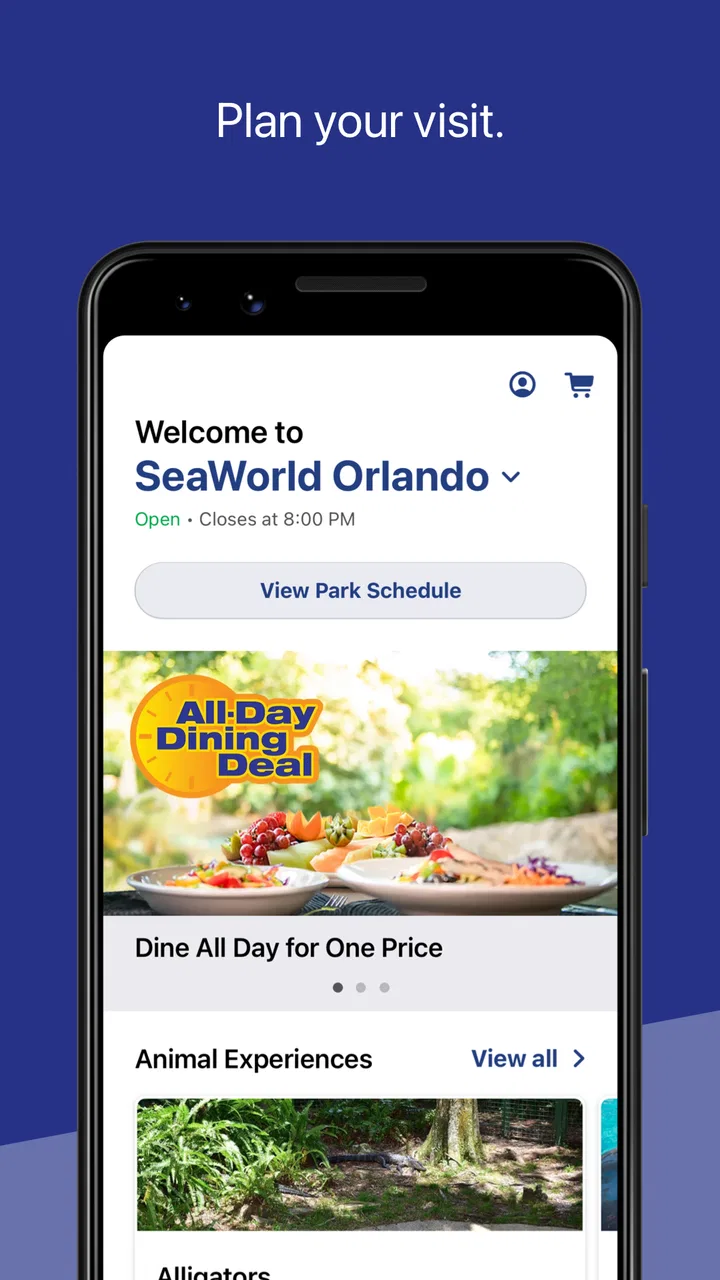
SeaWorld is the kind of travel app I would install before visiting a SeaWorld park, not because it replaces every planning tool, but because it brings the information I am most likely to need while moving around the park. Its focus is practical: maps, wait times, and park hours in one place. That narrow purpose is also its appeal. Instead of opening a general map service, searching through web pages, or relying on signs whenever I need an update, I can use a park-specific app built by SeaWorld Parks & Entertainment Inc.
In my experience, the value of an app like this depends heavily on timing and connectivity. A map is useful before I arrive, but live wait information matters most when I am already inside, deciding whether to cross the park for a ride or change plans. That means the app can be genuinely helpful in a busy visit, while also becoming less dependable if my connection is weak or I expect it to work like a complete offline guide.
What the app is really useful for before a visit
The first thing I would do with SeaWorld is check the park hours before leaving home. That sounds basic, but it prevents a surprisingly common travel mistake: planning around an assumed opening time rather than the actual schedule shown in the official park app. I can then use the map to get familiar with the general layout and think about which areas I want to reach first.
You May Also Like

 Blood Strike: 2.5 Anniversary
Blood Strike’s Loadouts Turn Every Drop Into a Tactical Gamble
A close look at Blood Strike’s custom loadouts: how fast access to signature weapons reshapes its battle royale rhythm, rewards preparation, and narrows the gap between fights.

 Pandora - Music & Podcasts
Pandora’s Music Is Easy to Start, but Harder to Recover
Pandora’s strength is its low-effort path from a seed to a station. Its weak spot is how much confidence it asks you to place in connection, setup, and quiet recovery.

 8 Ball Pool
 Is Built on Rivalries, Rematches, and Routine
A close look at the rivalries, rematches, shared routines, and unanswered safety questions that turn a quick pool match into a persistent mobile community.

 Samsung Music
’s Quiet Strength Is Playing What You Already Own
Its reach comes less from spectacle than from dependable access to a personal library. That simplicity is both the app’s strongest retention engine and its ceiling.

 AccuWeather: Weather Radar
AccuWeather Review: A Quick, Clear Forecast for Everyday Decisions
For everyday plans, the best forecast is the one you can understand quickly. AccuWeather makes rain timing, radar, and local conditions easy to act on, with a few trade-offs.

 Hill Climb Racing
Why Hill Climb Racing Still Turns Crashes Into One More Run
A tiny car, a bumpy hill and one more upgrade: Hill Climb Racing keeps resurfacing because its simple chaos makes every near-miss feel personal.
More From Our News Desk



I would not treat that preparation as a detailed itinerary-building session. The app’s store summary points to maps, wait times, and park hours, so its strength is quick orientation rather than replacing a full travel planner. For a family trying to coordinate a first visit, the map can still reduce uncertainty. Knowing where attractions and park areas sit relative to one another makes it easier to choose a meeting point and avoid wandering immediately after entering.
There is also a useful distinction between planning from home and making decisions on site. At home, I care about opening information and a broad sense of location. Inside the park, I care about what is close to me and whether a wait justifies walking there. The same app serves both moments, but I would use it differently in each one.
The most important habit is to check time-sensitive information before building your day around it. Park hours and attraction waits are not the sort of details I would screenshot once and trust for the entire visit. A schedule can change, and a wait time can become outdated while I am walking. The app is more useful when I treat it as a current reference rather than a fixed itinerary.
Why a park map beats a general map in this situation
A normal mapping app is excellent for getting to the park, finding nearby food, or checking the route from a hotel. It is not necessarily the best tool for understanding an attraction’s internal layout. A dedicated SeaWorld map has a more relevant purpose: helping me think in terms of park areas, attractions, and walking choices rather than public roads.
That difference becomes clearer when I am already through the entrance. A general map may show the venue as a single destination, while the official app is intended to help me navigate what is inside. I would still use my usual navigation app for the journey to the park, then switch to SeaWorld once the visit itself becomes the problem I am trying to solve.
The trade-off is that a dedicated app is less useful outside the park. If I want a restaurant away from the venue, compare hotel routes, or organize a wider trip, I would return to a general travel service. SeaWorld is a companion for the park day, not a replacement for broader travel planning.
How connectivity changes the experience inside the park
Wait times are where a network connection matters most. If I am standing near one attraction and considering another across the park, a current estimate can influence whether I move now, eat first, or stay where I am. Without a recent connection, that decision becomes guesswork. The app’s usefulness therefore rises and falls with how current the information is when I look at it.
I would avoid making a long cross-park walk based on a single glance. Instead, I would check the wait, start moving, and reassess when I am closer if the decision is important. This is not because the app is necessarily wrong; it is because live conditions can change between checking the screen and reaching the attraction. The app helps me make a better decision, but it cannot remove the uncertainty of a busy park.
Connectivity can also affect the map experience. A map is less demanding than live wait information, but I would still open the relevant view before I am in a crowded area with an unreliable signal. When I have a clear connection, I can prepare the screen I expect to use next rather than waiting until I am lost or trying to coordinate with a group.
That preparation is one of the more useful, non-obvious habits I would recommend: look ahead while the connection is good, not only when the information becomes urgent. Before leaving a comfortable spot, I would check the next destination and current wait information. It makes the app less of an emergency tool and more of a quiet planning aid.
A realistic day with the app
Imagine arriving with children shortly after opening. I would first confirm the park hours and use the map to choose a starting area. After the first attraction, I would check the wait-time view before walking toward another part of the park. If the next option is busy, I might choose something nearby instead of spending time crossing the park only to face another queue.
Later, when everyone is tired, the map becomes less about discovering everything and more about reducing unnecessary walking. I can use it to decide whether the next stop is close enough to be practical or whether it makes more sense to pause. If one person in the group wants an attraction while others need a break, a shared map reference can make it easier to agree on where to meet afterward.
In that scenario, the app does not create a perfect schedule. It helps me adapt. That is a better measure of its value, because theme-park visits rarely follow the original plan exactly. Waits, energy levels, meal breaks, and changing priorities all affect the day. A tool that supports quick changes is more useful than one that encourages an over-detailed plan I will abandon after the first delay.
What to do when the signal is unreliable
If the app takes longer than expected to update, I would not repeatedly refresh while standing in the middle of a crowded walkway. I would move to a less congested spot, give the screen a moment, and use visible park signs as a backup for immediate orientation. The app should support my decisions, not make me ignore the physical information around me.
I would also keep the most important meeting details outside the app. If my group separates, I would agree on a recognizable meeting place before anyone walks away. A digital map can help locate that place, but a plan that depends on every phone maintaining a connection is fragile. This is especially important for families or groups with different devices and battery levels.
When information does load again, I would treat the refreshed result as a new snapshot rather than proof that every earlier detail remains current. That mindset avoids a common mistake with connected travel apps: assuming that a successful refresh guarantees uninterrupted accuracy for the rest of the visit.
Using it comfortably on a phone
SeaWorld makes the most sense in short, repeated sessions. I would open it to answer one question, close it while walking, then check again when I reach the next decision point. That is more natural than keeping the app open constantly, especially during a long day when I am also taking photos, messaging family, and using other phone functions.
The mobile context matters because park navigation is rarely a desk activity. I may be carrying a bag, watching children, looking for a restroom, or trying not to block a busy path. A useful app in that environment needs to reduce mental load. I would rather use a clear map for a quick direction than read a long explanation while moving.
For that reason, I would not expect the app to answer every question I have about the visit. If I need detailed accessibility planning, dining research, transportation advice, or broader destination information, I would look for the relevant official or general travel resource as well. SeaWorld is most effective when I ask it for the park information it is designed to provide.
The app is free, which removes the usual hesitation about installing it for a single trip. Its content rating is Everyone, so it is suitable as a family-oriented utility. I still would not hand the entire planning responsibility to a child, though. The map can help children understand where they are, but an adult should manage changing plans, group coordination, and any decisions involving a weak connection or a low battery.
Battery, attention, and data-conscious use
Connected maps and repeated wait-time checks can encourage unnecessary screen use. I would avoid leaving location-heavy or constantly updating views open when I am not actively using them. Closing the app between decisions is a simple way to preserve attention and reduce avoidable phone activity, even without assuming anything specific about its technical behavior.
On mobile data, I would be selective. I would check the map and wait information when they can change my next decision, rather than refreshing out of habit. If I am seated and connected to reliable Wi-Fi before entering, I would use that time to review the park layout and hours. I would not assume that every screen will remain available later without a connection, so I would keep my expectations realistic and use the physical park signs as a parallel source of guidance.
A second useful workflow is to decide on a small number of priorities before arrival. Then, inside the park, I only need the app to help with the next choice. This reduces the number of times I consult it and prevents live data from taking over the whole experience. I want the phone to improve the day, not become the day.
Another trade-off is screen attention. If I am constantly looking down to compare waits, I may miss the atmosphere, animal presentations, or time with the people I came with. I would use the app at natural pauses: before leaving an area, after finishing an attraction, or while the group is already deciding what to do. That rhythm makes the tool feel helpful rather than distracting.
Where it fits among the usual alternatives
Compared with a general web search, SeaWorld should be faster for the park-specific information I need during a visit. Searching the web can produce useful results, but it may involve several pages, outdated snippets, or information mixed with unrelated locations. A dedicated app gives me a single place to begin when the question is about the SeaWorld park itself.
Compared with a general map app, it is more relevant inside the venue but less versatile outside it. I would use the general map for driving, hotels, nearby shops, and the wider trip. I would use SeaWorld for the internal park view and wait-time decisions. The two tools work better together than either one does alone.
Compared with paper maps or posted signs, the app has the advantage of being easier to consult for changing information. Physical signs remain valuable when my phone battery is low, the signal is poor, or I need immediate orientation without stopping to load a screen. I would not discard those alternatives; I would use them as a dependable backup.
Compared with planning everything in a notes app, SeaWorld saves me from manually organizing the park-specific information I need. Notes are still useful for my own list of priorities, reservation details, or group meeting plans, but they will not naturally replace a live wait-time view. The best setup for me would be a small personal plan supported by the official app, not one or the other.
Who should install it, and who can skip it?
I think it is a strong choice for someone visiting SeaWorld soon, especially a first-time visitor, a family trying to reduce unnecessary walking, or anyone who wants park hours and wait information in one official place. The fact that it is free makes it easy to try before deciding whether it deserves regular use during the trip.
I would be less enthusiastic for someone who is only researching the destination from far away and does not yet have a visit planned. A general travel app may be more useful for comparing hotels, transportation, and nearby attractions. Likewise, a visitor who prefers to keep the phone away all day can rely on signs and staff rather than expecting this app to add much value.
It is also not the right sole tool for a group that has no agreed meeting plan or whose phones are nearly out of battery. The app can improve coordination, but it cannot replace basic preparation. I would make sure everyone knows where to regroup and would avoid assuming that live information will always be available at exactly the moment I need it.
My overall view after looking at the complete experience
SeaWorld is a focused Travel & Local app rather than an all-purpose trip organizer. Developed by SeaWorld Parks & Entertainment Inc., it has been available since Apr 14, 2011, and its current version is 7.1.17.117525. It is free, supports devices running iOS 9 or later, and has reached over a million installs with a 4.4 average from around twelve thousand ratings. Those figures suggest that many visitors see value in having an official park companion, but the practical question is whether its specific tools match the way I plan to spend the day.
For me, they do, as long as I use the app with the right expectations. Maps help with internal orientation, park hours help before I set out, and wait times help me make flexible choices. The connection-dependent nature of those choices is the main limitation. I would not rely on it as an offline guide, a replacement for signs, or a complete answer to every travel question. Instead, I would check important information while connected, avoid excessive refreshing, and keep a simple backup plan for meeting points and navigation.
My recommendation is straightforward: if I were visiting SeaWorld, I would install it before leaving home and use it as a lightweight decision tool throughout the day. I would pair it with a general map for the journey, personal notes for priorities, and common-sense backup plans for weak signal or low battery. Used that way, SeaWorld is most valuable when it helps me change plans intelligently without making me stare at my phone all day.
That balance is what makes it worth having. It will not remove queues, walking, or the unpredictability of a busy park, and it should not pretend to. But when I need to know the park’s hours, understand where I am going, or decide whether the next wait is worth the trip, it puts the relevant information close at hand. For a planned SeaWorld visit, that is a useful role—and a more honest one than expecting a single app to manage the entire experience.
FAQs for SeaWorld
01What is SeaWorld, and what can I do with this app?
SeaWorld is a virtual ocean adventure app that allows users to explore marine life through interactive experiences. You can learn about various sea creatures, engage in virtual tours of underwater habitats, and participate in conservation activities. The app offers educational content and fun games designed to increase awareness of ocean ecosystems.
02Is SeaWorld suitable for children, and does it have parental controls?
Yes, SeaWorld is designed to be family-friendly and includes educational content suitable for children. It features built-in parental controls that allow parents to monitor and restrict content based on age-appropriateness. This ensures a safe and enjoyable experience for younger users while they explore the wonders of the sea.
03Does SeaWorld require an internet connection to function?
SeaWorld requires an internet connection for initial setup, updates, and accessing certain features like live events and community interactions. However, many of the educational modules and games can be downloaded for offline use, allowing users to enjoy the app without a constant internet connection.
04Are there any in-app purchases or subscriptions within SeaWorld?
SeaWorld offers a free version with basic features, but it also includes in-app purchases and subscription options for additional content and premium features. These might include exclusive marine creature encounters, advanced educational modules, and ad-free experiences. Users can choose to enhance their experience with these optional purchases.
05How does SeaWorld contribute to marine conservation efforts?
SeaWorld collaborates with marine conservation organizations to provide users with educational content about ocean conservation. The app also hosts virtual events and challenges that encourage users to participate in real-world conservation initiatives. A portion of the app's revenue supports marine preservation projects, making it a platform that actively contributes to ocean health.
Pros
- Engaging and educational marine life content.
- Stunning graphics and realistic ocean sounds.
- User-friendly interface with intuitive navigation.
- Regular updates with new features and content.
- Offline mode available for uninterrupted play.
Cons
- Limited free content
- requires in-app purchases.
- Occasional ads interrupt gameplay experience.
- High battery consumption during extended use.
- Requires constant internet for some features.
- Large app size may affect device storage.

SeaWorld
Gallery